HIDra v2.2: better device knowledge, more reliable syntax checks
Corrected device references, clearer syntax checks and more room for your conversation. See what changed in HIDra v2.2 and what our targeted tests actually measured.
A script can look right and still use the wrong command for your device. HIDra v2.2 focuses on that gap: the details that determine whether a suggestion belongs in a Flipper Zero script, a USB Rubber Ducky payload or native Evil Crow Cable Wind code.
This update brings corrected device references, more precise syntax checks and fixes to how Sapsan Terminal passes code to its assistant. It builds on the existing HIDra Flash and HIDra Plus models. The version number identifies the updated assistant and its supporting software.
Device-specific details, checked against the source
We reviewed the documentation available on September 7, 2026 and, where necessary, the manufacturer's parser. That exposed conflicting rules in our knowledge and examples.
For Evil Crow Cable Wind, we corrected the guidance on comments, command spelling, key names and key release behavior. We also clarified that RunMac enters text through Spotlight. Treating it as an automatically opened shell leads to the wrong instructions. These changes were checked against the manufacturer's Wind firmware.
For Flipper Zero, the corrected references recognize modifier combinations separated by spaces or hyphens. They also recognize that STRINGLN types text followed by Enter, as the official BadUSB documentation specifies. The Flipper STRINGLN correction was deployed earlier in the same update sequence.
For O.MG devices, we removed a conflicting restriction on STRINGLN and corrected the documented USB ON / USB OFF arguments. Both are described in the manufacturer's syntax guide.
For USB Rubber Ducky, we corrected guidance on RETURN inside functions and improved validation of complete text and comment blocks. The relevant rules come from Hak5's documentation on functions and text input.
Clearer feedback when checking a script
The validator now catches more of the dialect mistakes identified during the audit and avoids several false warnings on valid syntax. For example, a command name appearing inside text to be typed should not be treated as an instruction to execute.
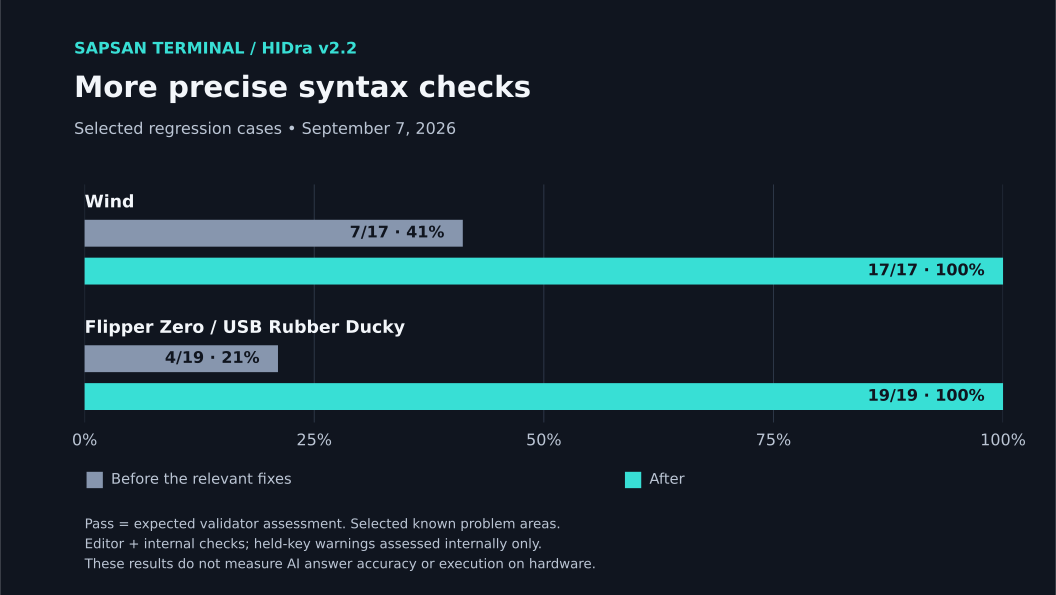
We checked the same selected inputs before and after the relevant fixes, against predefined expectations:
| Selected validation checks | Before the relevant fixes | After |
|---|---|---|
| Wind | 7/17 (41%) | 17/17 (100%) |
| Flipper Zero / USB Rubber Ducky | 4/19 (21%) | 19/19 (100%) |
These are targeted regression checks of known problem areas. A pass means the validators produced the expected assessment for that input. The checks cover editor validation and internal diagnostics; held-key warnings were assessed in internal diagnostics only. They do not measure the percentage of AI-generated scripts that work on hardware.
More complete knowledge and code context
We restored 34 documentation fragments confirmed to have been cut off at 1,000 characters. The corrected import preserves their full content, including information that previously disappeared from the end of a reference.
HIDra Plus also receives the supplied editor context without the previous 500-character cut-off in the prompt builder. We fixed response cleanup that could strip a meaningful space or line break from an autocomplete suggestion. These changes preserve the information being passed through the application; the assistant still has to use it correctly.
More room for a continuing conversation
The September 8 release also replaces the fixed 10, 15 and 25-message history windows with an input token budget: 16,000 tokens for Free and 32,000 for Premium, including Premium's Flash option. The budget covers assistant instructions, retrieved documentation, conversation context and any supplied editor code.
Short conversations keep their messages in full. When the budget fills, older discussion is condensed into conversation notes that carry requirements, corrections and unresolved work forward. You can inspect those notes in the chat. The latest complete code is preserved separately without rewriting it, and supplied editor code is kept in full. Oversized requests show a clear message so you can adjust the input.
Questions can now contain up to 12,000 characters on Free and 32,000 on Premium. A character counter shows the limit before you send. The context indicator reports input tokens for the last successful request, and a failed request leaves your question available to retry.
These conversation changes were added for the September 8 release. The numerical results below describe the earlier September 7 repair checks; they are not measurements of conversation summarization quality.
What changed in the AI answers
Alongside the code checks, we asked the existing models targeted questions before and after correcting the relevant knowledge. The final recorded answers passed more of the specific rules being checked:
| Targeted rule checks | Before | After the final correction |
|---|---|---|
| Free | 5/20 (25%) | 15/20 (75%) |
| Pro | 6/20 (30%) | 17/20 (85%) |
This was a repair exercise using selected problem cases, with some fixes refined on the same questions. A rule could pass while the answer contained another mistake. These figures are exploratory results within each plan, not an independent comparison of the plans or a measure of overall answer accuracy. Call-to-call variation also prevents attributing every score change to a code fix.
Remaining failures matter. In the separate final check with freshly retrieved knowledge, 5 of 14 chat answers and both autocomplete attempts failed their task criteria. One Pro answer received the relevant editor code but did not correct it. We are therefore making no measured claim of improved autocomplete task success in this release.
The scope of v2.2
The release addresses concrete errors in device knowledge, syntax validation and context handling. The repair build passed 341 automated tests, with none skipped in that selected suite. The 36 selected validator checks also passed in verification after deployment.
The work used the existing Free and Pro models and application prompt builders. Controlled before/after checks kept the question and model settings fixed and, for knowledge checks, retained the selected reference IDs while updating their content. Response time and physical script execution were outside this test.
The result is a more consistent foundation for writing and reviewing device-specific scripts in Sapsan Terminal, with the changes and their measured limits made explicit.